Workshop
From the design to the saw.
Cut lists, part labels and machine-ready exports come from the same design you drew and quoted. No retyping parts, and no second program to keep in step.
Cut list
Every part, sized and named.
The cut list is built from the units in the design: sides, bottoms, rails, doors and drawer fronts, each with its size, quantity and board. Change a unit in the design and its parts follow.
| Part | Name | Qty | Size, mm |
|---|---|---|---|
| SB-SIDE-L | Sink base side | 1 | 720 × 560 |
| SB-BASE | Sink base bottom | 1 | 964 × 480 |
| SB-DOOR | Door, Shaker | 2 | 715 × 497 |
| DP-FRONT | Drawer front | 3 | 796 × 237 |
Sheets and labels
Nested sheets and labels to stick on as you cut.
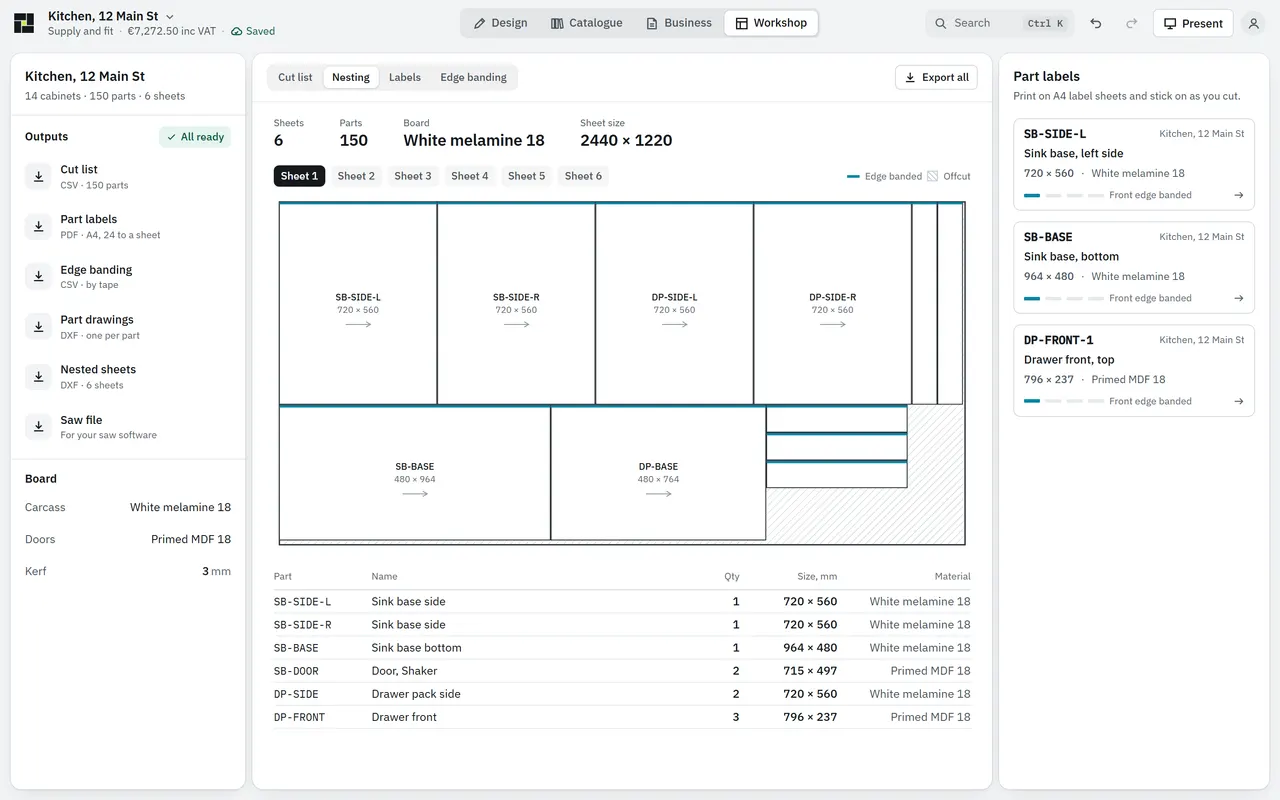
Parts are laid out on your sheet size with the kerf allowed for, edge banding and grain marked. Print part labels on A4 label sheets so every piece is identified from the saw to the fit.
Exports
Machine-ready files.
Export DXF files for parts and nested sheets, and saw files for your saw software, alongside the cut list, edge banding list and labels.
- Cut listCSV
- Part labelsPDF, A4 label sheets
- Edge bandingCSV
- Part drawingsDXF
- Nested sheetsDXF
- Saw fileFor your saw software
Early access
Be one of the first workshops on Cabinetform.
Early access is opening to a small number of makers and fitters first. Tell us about your workshop and we’ll be in touch when your place is ready.